
Athletes can be added manually to each team you create. One athlete can be added to a team multiple times.
By default, the app includes 5 athlete seats and unlimited guest seats. Guest seats cannot save or analyze performance data. To add more athlete seats with full data tracking and analysis, upgrade to the PLUS tier. Hear more about PLUS in our webinar here.
You can add a large number of athletes at once by importing a file. Here’s how:
-
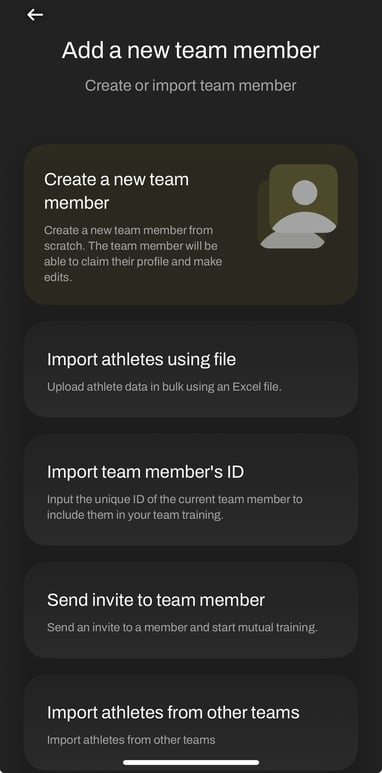
Open the Add a new team member page in the app.
-
Click Import athletes using file.
-
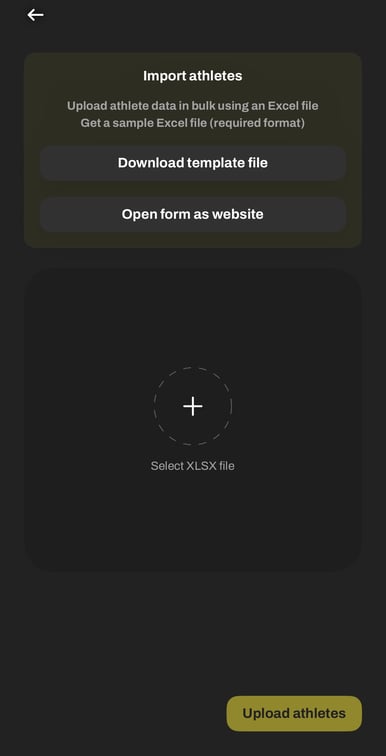
Choose either Download the template file or Open the form as a website.
-
Select the template format you want: Metric or Imperial.
-
The template will open as a spreadsheet (Excel, or Numbers on iPhone). Fill in each athlete’s details in the table, including: first name, last name, date of birth, email, weight, height, and gender.
-
Save the file, then return to the app and upload the completed template.
-
Once the upload is complete, your athletes will appear in the app and be ready to use.
Exporting athlete results: See here