
Hands-Free Start and Repeat Queue help you test multiple athletes and repetitions with less phone handling during a session.
With Hands-Free Start, the activity is loaded once and athletes complete the course one after another without the coach pressing Next between participants. Each result is automatically assigned according to the athlete’s position in the queue.
With Repeat Queue, the same group of athletes can complete multiple rounds without being added to the queue again.
Before You Start
Hands-Free Start:
- Is available only in Timing Gates Mode
- Requires an active Sportreact PLUS subscription
- Supports up to 50 repetitions in one session
- Saves results according to the athletes’ order in the queue
Athletes must follow the queue order for their results to be saved under the correct profiles.
How to Enable Hands-Free Start
1. Open or Create an Activity
From the homepage:
- Tap Create Activity, or
- Open a timing gate activity from Saved Activities or the Community Hub
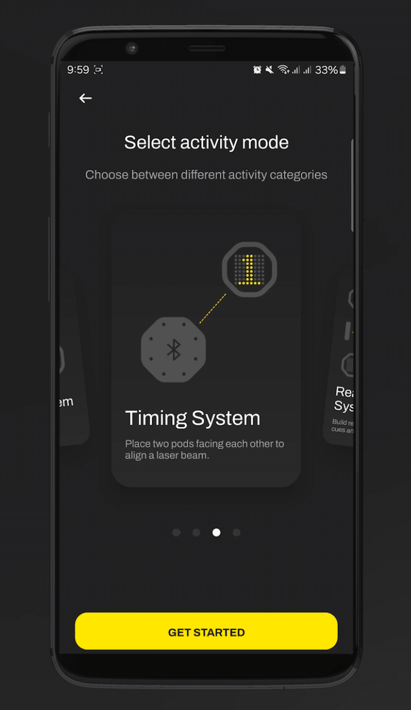
2. Enable Hands-Free Start
- Open the General tab.
- Find Activity Start Options.
- Select Trigger Start.
- Tick the box next to Hands-Free Start.
How to Set Up the Athlete Queue
- Open Choose Athletes to Start.
- Tap Add to Queue.
- Tick the boxes next to the athletes you want to include.
- Tap Add.
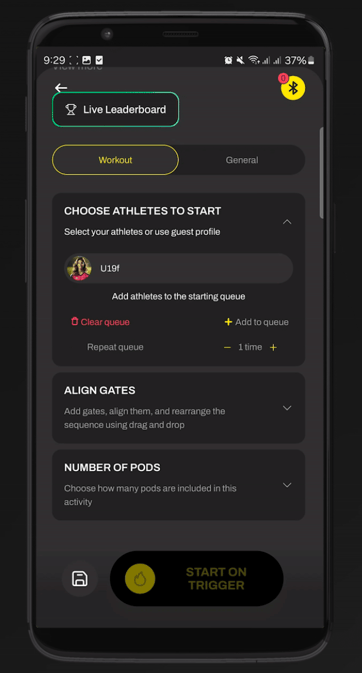
The athletes will complete the activity in the order shown in the queue.
You can change their order during the session by dragging and dropping their names.
How to Use Repeat Queue
The Repeat Queue option is available under Choose Athletes to Start.
Use the + and – buttons next to Repeat Queue to select how many times the full group should repeat the activity.
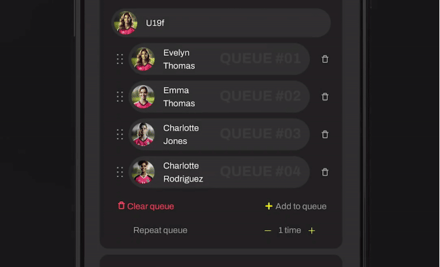
For example, if you add five athletes and select three rounds, each athlete will complete the activity three times.
After every athlete completes one full round, press Next to load the activity again for the following round. Once the activity reloads, the athletes can continue using Hands-Free Start.
Ways to Manage Multiple Repetitions
Option 1: Repeat Queue
Use this option when you are comfortable pressing Next between complete rounds.
- Add each athlete to the queue once.
- Select the number of rounds under Repeat Queue.
- Let every athlete complete the activity.
- Press Next after the full group finishes.
- The activity will reload for the next round.
You do not need to add the athletes again.
Option 2: Fully Hands-Free Session
Use this option when you do not want to press Next between rounds.
- Add the same athletes to the queue multiple times.
- Arrange them in the exact order in which they will complete the activity.
- Start the session once.
For example, for three athletes completing two repetitions each, your queue could be:
Athlete 1 → Athlete 2 → Athlete 3 → Athlete 1 → Athlete 2 → Athlete 3
The activity will continue without the coach touching the phone between repetitions.
Athletes must follow the displayed order so each result is saved under the correct profile.
Option 3: Back-to-Back Repetitions
This option works well for one athlete or a small group.
Add the same athlete multiple times in a row:
Athlete 1 → Athlete 1 → Athlete 1
Each repetition will be recorded separately and saved under that athlete’s profile.
For two athletes, you could use:
Athlete 1 → Athlete 1 → Athlete 2 → Athlete 2
Option 4: Guest Athletes
Use Guest Athletes when you want to run the activity hands-free without saving results to athlete profiles.
- Add one Guest Athlete for every planned repetition.
- Arrange the guest entries in the required order.
- Start the session.
For example, if you plan to run 20 repetitions, add 20 Guest Athletes.
The activity will run hands-free, but the results will not be saved to individual athlete profiles.
Choosing the Right Option
Use Repeat Queue when you want to add athletes once and do not mind pressing Next between rounds.
Add athletes multiple times when you want the entire session to run without touching the phone.
Add one athlete several times in a row for back-to-back individual testing.
Use Guest Athletes when athlete profile data does not need to be saved.